Software
Billing softwarefor retail shops
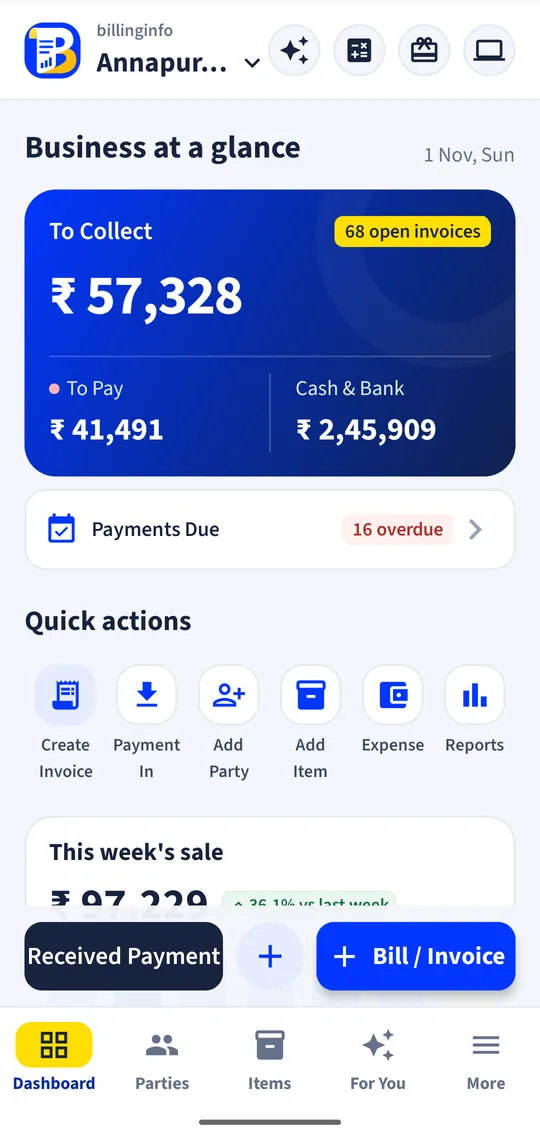
For the general store, the stationery shop, the gift counter and the mini-mart: bills in seconds, stock you can trust, and udhaar that never slips out of a notebook again.
Free for 15 invoices a monthAndroid and browserHindi, Gujarati and Hinglish
What it does
Quick counter bills
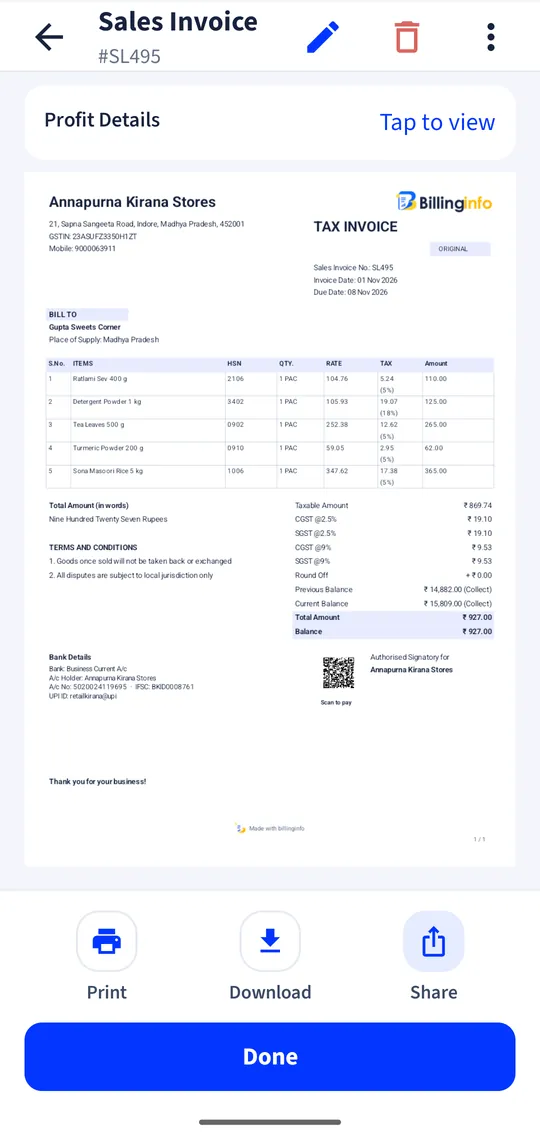
A cash sale without picking a customer, or a full GST invoice when the customer wants one.
Udhaar under control
Save a bill as unpaid and it adds to that customer’s balance; record part payments as they come.
Reminders you can send
A dues list with each customer’s balance; share a reminder or their ledger from your phone in one tap.
Stock without counting
Every bill reduces stock; low-stock levels tell you what to reorder.
Starter item lists
Add common grocery, stationery and FMCG products from the Items Library instead of typing them.
Loyalty points
Reward regulars with points and let them redeem points on a bill.
Online store link
Share your catalogue as a web page; customers send their order to your WhatsApp.
Thermal or A4
58 mm or 80 mm receipts from a Bluetooth printer, or A4 and A5 invoices.
Choosing billing software for a small shop
A retail counter needs three things from software, in this order: speed when there is a queue, a clear record of who owes you, and a stock list you believe. Everything else is extra. Before you choose, try making ten bills in a row on the phone you will actually use, and see how many taps each takes. Check that a customer’s balance is visible the moment you pick their name, and that you can bill when the network is weak.
Price matters too. A shop that makes a few hundred bills a month should not pay for features it will never open. billinginfo’s Free plan covers 15 sales invoices a month; Plus at ₹199 a month (before GST) removes the limit and adds GST reports, alerts and batches. Our retail and kirana page shows how a demo shop uses it day to day.
A day at the counter
Morning: the app lists the customers whose dues have crossed their credit period and the items running low; you share two reminders and place an order. Afternoon: bills go out at the counter, some paid by UPI, some on credit. Evening: you match the cash in the drawer against cash in hand, glance at today’s sales and close. If you have a helper at the counter, give them a billing-only login so they never see your margins.
Bills for every customer
Most retail sales are to consumers, so a simple bill is enough. When a business customer asks for a GST invoice with their GSTIN, make it from the same screen; it goes into the B2B part of your GSTR-1 report. If you are under the composition scheme or not registered, billinginfo makes a bill of supply instead.
Get started
- Sign in and choose your business type during setup.
- Add items from the Items Library or an Excel sheet.
- Pair a thermal printer if you use one.
- Start billing; check dues and low stock each morning.
Can I give credit (udhaar) to customers?
Yes. Save a bill as unpaid and it adds to that customer’s balance. Record payments as they come in.
Do my customers get SMS reminders automatically?
No. billinginfo shows who owes what; you share the reminder from your phone on WhatsApp, SMS or email.
Can I use it in Hindi or Gujarati?
Yes. The app and web app work in English, Hindi, Gujarati and Hinglish. Invoices print in English.
Is it free for a small shop?
Free for 15 sales invoices a month, forever. Busy shops move to Plus for unlimited bills.
Your next bill can
be a better one.
Free for 15 invoices a month. Try Plus for a week at ₹9. On your Android phone and in your browser.