Software
Restaurant billing softwarewith tables and KOTs
Take orders table by table on a phone, send KOTs to the kitchen, and turn them into one GST bill when the guests ask for it. Works on Android and in the browser, with a Bluetooth thermal printer or none at all.
Free for 15 invoices a monthAndroid and browserHindi, Gujarati and Hinglish
What it does
Tables and sections
AC, non-AC, family or terrace sections with seats; see which tables are running and for how much.
KOTs
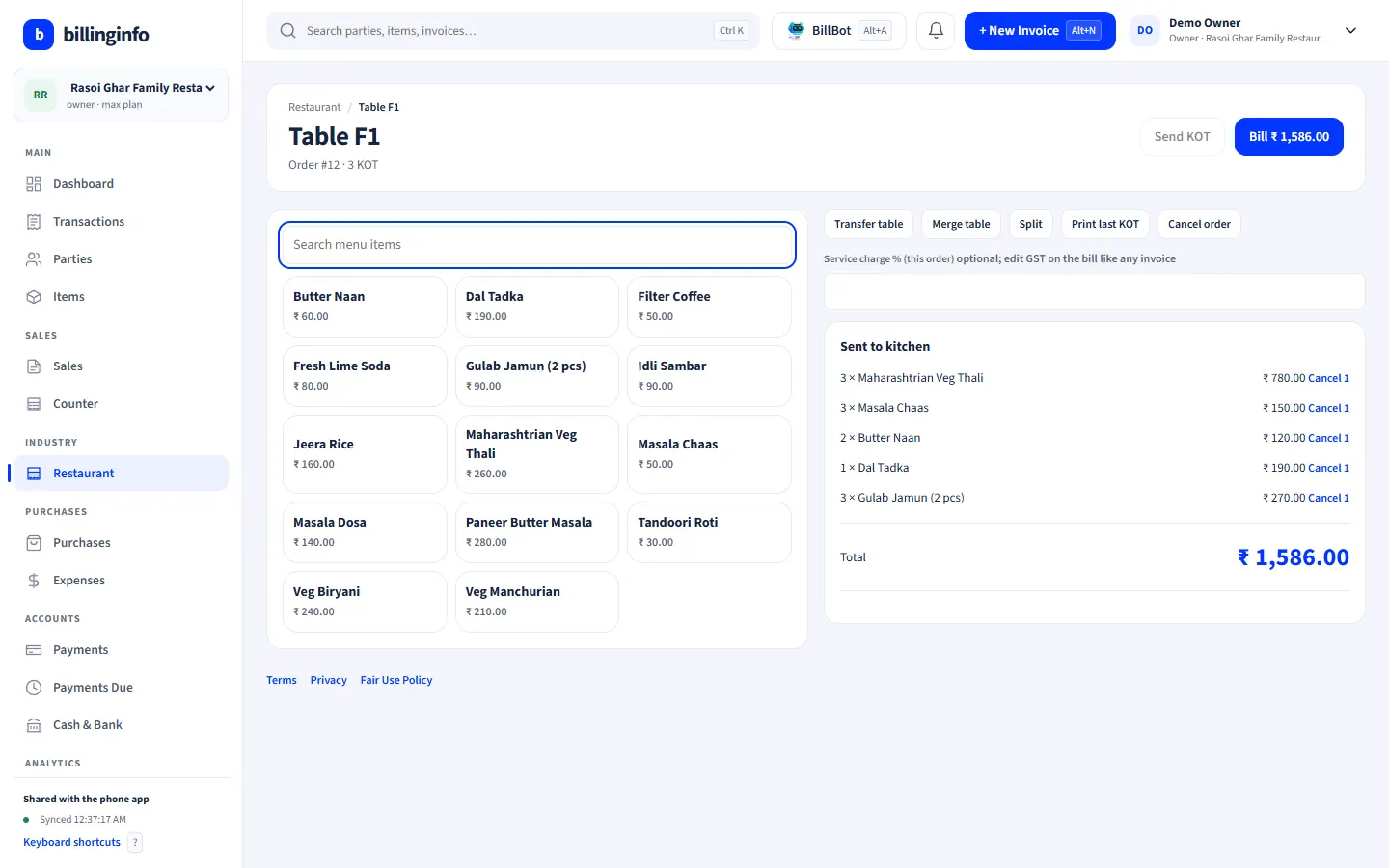
Tap items, add a note and send the KOT; it prints on a Bluetooth thermal printer from the phone or through the browser on a computer.
Running orders
Keep adding KOTs to a table; cancelled items print as CANCEL on the next KOT.
Takeaway and delivery
Orders with the customer’s name, mobile and address.
Move, merge, split
Move an order to another table, merge tables, or split items off.
One-tap bill
All KOTs merged into one GST invoice, with an optional service charge, and the table freed.
Waiter logins
Waiters take orders on their own phones with a Salesman login; tables update everywhere.
Restaurant GST
5% by default, with an 18% option for restaurants in hotels with room tariffs above ₹7,500.
Picking restaurant software
A restaurant’s billing problem is not the bill, it is everything before it: orders that change, KOTs that must reach the kitchen, tables that merge, and a rush hour when nobody has time to add up slips. Good software keeps the order open and makes the bill from it, so nothing ordered is missed and nothing cancelled is charged. Check how many taps a waiter needs per item, whether the kitchen can work without a dedicated KOT printer, and what happens when the internet drops in the middle of service.
billinginfo’s restaurant tools are an industry module on the Plus, Pro and Max plans, on the phone and the web app. See the restaurants page for a demo restaurant’s screens.
How a service runs
A family sits at table F1. The waiter opens F1 on his phone, taps two dosas and a filter coffee, writes “less spicy”, and sends the KOT; it prints at the kitchen. Ten minutes later he adds dessert on a second KOT. When the family asks for the bill, the cashier opens F1 and taps Bill: one invoice with all items merged, 5% GST, cash or UPI, and F1 shows free again.
GST for restaurants, briefly
Restaurant service outside specified premises is taxed at 5% without input tax credit; restaurants in hotels with room tariffs above ₹7,500 charge 18% with input credit. Service charge is optional for the guest. billinginfo uses 5% by default and lets you change it in restaurant settings and on any item. Read our GST rates guide for sources.
Get started
- Set your industry type to Hotels & Restaurants (or switch on Restaurant in Business Settings → Industry modules).
- Add menu items and your table sections.
- Pair a Bluetooth thermal printer for KOTs and bills, or print through the browser.
- Give waiters Salesman logins and start taking orders.
Do I need a separate KOT printer?
No. One Bluetooth thermal printer can print KOTs and bills, and you can take orders without printing KOTs at all.
Does it work with food delivery apps?
Orders from delivery apps are not imported automatically. Enter them as delivery orders if you want them in your books.
Is there a separate inventory of ingredients?
Menu items can carry stock like any item. Recipe-level consumption of ingredients is not tracked by the restaurant module.
Which plan do I need?
Industry modules are part of Plus, Pro and Max. Try Plus for a week at ₹9.
Your next bill can
be a better one.
Free for 15 invoices a month. Try Plus for a week at ₹9. On your Android phone and in your browser.