Software
Inventory managementthat runs on your bills
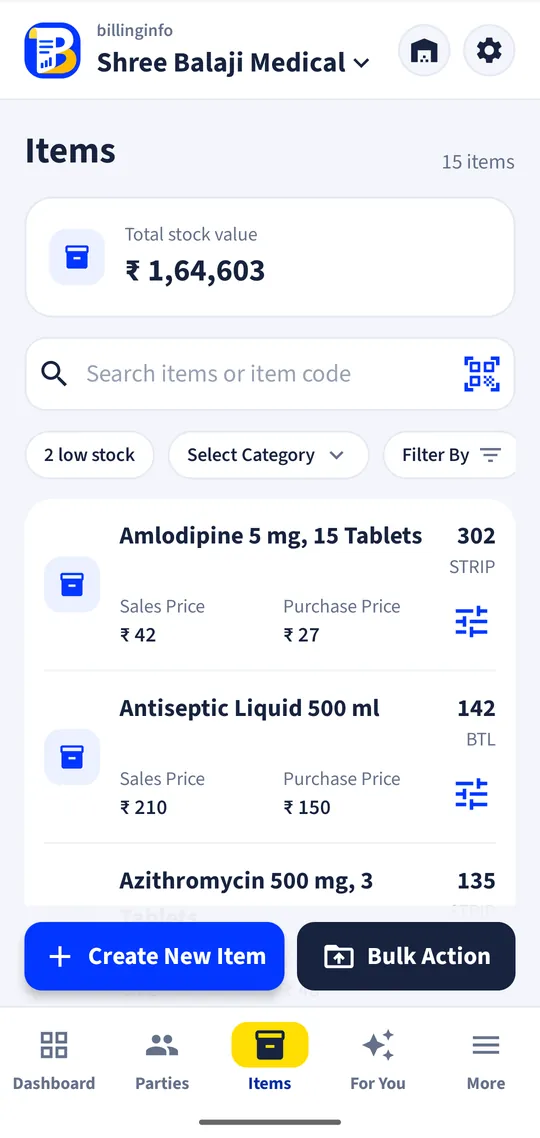
Stock moves when you sell, buy or take a return. billinginfo tracks quantities in more than one unit and more than one godown, follows batches and expiry, records serial numbers, and tells you what to reorder.
Free for 15 invoices a monthAndroid and browserHindi, Gujarati and Hinglish
What it does
Stock from every document
Sales, purchases, returns, challans and stock adjustments all move stock, so the number on screen is the number on the shelf.
Two units per item
Buy by the box and sell by the strip, or buy by the dozen and sell by the piece; the conversion and price are worked out for you.
Batches and expiry
Batch number, manufacturing and expiry dates and MRP per batch. Bills offer the earliest-expiry batch first (FEFO) and block expired batches on sales.
Serial and IMEI numbers
Record each unit’s serial when it comes in, pick it when you sell, and search a serial to see who bought it.
Godowns
Stock per location, with stock transfers between godowns, and the godown chosen per line on a bill (paid plans).
Low stock and expiring soon
Alerts and a screen for items below their minimum and batches about to expire.
Fast setup
Bulk upload from Excel or CSV (columns read by their headings, including batch, expiry and MRP), the Items Library of ready products, or AI scan of a supplier bill.
Stock reports
Stock summary and value, low stock, batch-wise and expiring stock, and item-wise sales and profit.
Why stock goes wrong, and how software fixes it
Stock records drift for three reasons: sales that never reach the register, purchases entered late, and returns or breakage nobody writes down. When the stock count lives inside the billing app, the first two disappear: you cannot make a bill without moving stock, and the purchase you enter (or scan) adds it back. For the third, a stock adjustment takes ten seconds and keeps a reason with it.
The other half of inventory is knowing what to buy. Set a low-stock level on the items that matter and billinginfo lists them every morning, along with batches close to expiry, so your order to the distributor is a list rather than a guess.
What to look for in inventory software
Check that it handles the way you actually buy and sell: loose and packed, boxes and pieces, kilos and grams. Check batches if you sell anything that expires, serial numbers if you sell anything with a warranty, and godowns if stock sits in more than one place. Then check setup: a shop with 2,000 items will not type them one by one. In billinginfo, batches, serial numbers and godowns are on the paid plans; units, stock and low-stock levels are on every plan.
A worked example
A medical store buys 10 boxes of a tablet, 10 strips per box, in batch B2417 expiring in March. The purchase adds 100 strips. At the counter the pharmacist sells 3 strips: the bill offers batch B2417 first because it expires earliest, prints the batch and expiry under the item, and leaves 97 strips. When stock falls below the 20-strip level set on the item, it appears in the low-stock list.
Get started
- Add items with unit, price, GST rate and opening stock, or upload an Excel sheet.
- Turn on batches, serial numbers or godowns in item settings if you need them.
- Enter purchases (or scan the supplier bill) to add stock; sales take it out.
- Set low-stock levels and check the stock reports.
Can I import my item list from Excel?
Yes. Items → Upload items in bulk reads Excel or CSV by column headings, including batch, expiry and MRP.
Does it support barcodes?
Yes. Scan with the phone camera or a USB scanner on the computer, and print barcode labels on A4 sheets. See barcode billing.
Does stock sync between the phone and the computer?
Yes. The same stock shows in the Android app and the web app and updates within seconds when you are online.
Which features need a paid plan?
Batches and expiry, serial and IMEI numbers and godowns are in Plus, Pro and Max. Stock, units and low-stock levels are on every plan.
Your next bill can
be a better one.
Free for 15 invoices a month. Try Plus for a week at ₹9. On your Android phone and in your browser.